Posts

Showing posts with the label rootkits

Plugin Post: Robust Process Scanner
Image
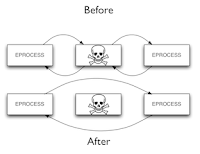
It's pretty well known, in memory forensics circles, that there are two common ways of finding processes in memory images: list-walking , which traverses the kernel's linked list of process data structures, and scanning , which does a sweep over memory, looking for byte patterns that match the data found in a process data structure. Having two different ways of finding processes can be very handy, especially when we suspect that someone may be trying to hide processes. One common way of hiding processes in Windows is called DKOM (Direct Kernel Object Manipulation) ; this technique works by just unlinking the process you want to hide from the kernel's list, like so: This makes it invisible from programs such as the task manager, as well as memory forensic tools that use list-walking (including Volatility's pslist). However, such hidden processes can still be found by scanning memory using a signature for the process data structure; this is what psscan2 does. Unfortunatel...

Plugin Post: Moddump

By now, you all probably know that you can dump running programs from memory using the procdump module in Volatility. But not all malware runs as a user-mode process. What about malicious kernel modules? As it turns out, dumping these is also quite straightforward, and it's easy to write a plugin to do it. In fact, it's downright trivial -- kernel modules are just PE files mapped into kernel memory (in exactly the same way as normal programs are PE files mapped into user memory). So to dump a particular kernel module, we can use Volatility's built-in PE dumper (the source is in forensics/win32/executable.py , and point it at the memory address of a kernel module. Naturally, I've made a plugin that implements this: grab moddump.py and put it in your memory_plugins directory, and you'll be good to go. Here's what it looks like in action: $ python volatility moddump --help Usage: moddump [options] (see --help) Options: -h, --help show this help mes...

Auditing the System Call Table

When malicious, kernel-level code is installed on the system, one action it may take is to hook various system services. What this means is that it takes some standard piece of operating system functionality and replaces it with its own code, allowing it to alter the way all other programs use the OS. For example, it may hook functions involved in opening registry keys, and modify their output so as to hide registry keys the rootkit uses. As system calls are the primary interface between user and kernel mode, the system call table is a popular place to do such hooking. It's worth noting that many security products also make heavy use of hooking. One common example is antivirus software; among the many functions it hooks is NtCreateProcess (used, as the name suggests, to start a new process) so that it can do its on-demand scanning of any newly launched programs. For this reason, it's not safe to assume that any hooking of system calls is malicious; in fact, some of the most su...